

Cloud-Based Spatial Intelligence: Core Analytics of Terra MapX
The primary operational challenge in modern reality capture is no longer collecting field data. It is processing, distributing, and extracting actionable intelligence from the massive datasets generated.
A multi-square-kilometer aerial LiDAR and photogrammetry mission routinely produces hundreds of gigabytes of raw data: billions of 3D point cloud coordinates (LAS/LAZ), massive high-resolution orthomosaic rasters (GeoTIFF), bare-earth elevation grids, and multi-trade Building Information Models (BIM).
Historically, distributing these deliverables to commercial managers, earthwork superintendents, and consulting engineers created severe logistical friction.
Project stakeholders were forced to download multi-gigabyte archives, maintain high-end graphics workstations with dedicated discrete GPUs, and install specialized CAD or GIS licenses that field personnel rarely possess.
Consequently, survey data remained locked inside specialized engineering offices, delaying site decisions and slowing down interim contractor payments.
Terra MapX resolves this bottleneck by providing a high-performance, browser-based geospatial and engineering analytics platform.
Operating through an enterprise workspace architecture, comprising dedicated modules for Projects, Jobs, Map Viewer, Reports, and Audit Logs.
Terra MapX ingests complex reality-capture outputs into a cloud-native engine.
Project stakeholders across royal commissions, municipal authorities, master developers, and construction supervision teams log into an intuitive web portal to visualize multi-gigabyte sites at 60 frames per second, conduct interactive spatial measurements, verify contractor earthmoving quantities, and perform multi-trade clash detection directly within any commercial web browser.
Workspace Structure, Processing Pipelines, and Cloud File Handling
Terra MapX structures large-scale infrastructure projects through a centralized management hierarchy.
Each project record supports regional and international geodetic standards, including WGS84 (EPSG:4326) and the Saudi Arabian National Spatial Reference System (such as KSA-GRF17), ensuring that all incoming drone flights and engineering design surfaces maintain absolute spatial alignment.
Data governance and technical delivery within Terra MapX rely on two primary components:
- The Jobs Processing Pipeline: Links raw survey data directly to engineering QA/QC standards. The platform tracks multi-stage data processing workflows step-by-step, including Post-Processed Kinematic (PPK) trajectory solving, Aerotriangulation, Ground Control Point (GCP) Optimization, Dense Cloud Production, Point Cloud Classification, DEM Production, Ortho Production, and Output Export. Data managers attach progress notes, associate linked deliverables, and upload verification evidence (such as calibration logs and accuracy reports) before publishing datasets to the wider project team.
- The Cloud Files Repository: Automatically organizes processed outputs into web-optimized data layers. These include Cloud Optimized GeoTIFFs for bare-earth Digital Terrain Models (DTM_cog.tif) and Digital Surface Models (DSM_cog.tif), full-resolution true-color visual rasters (Orthophoto.tif), packaged vector contour archives (Contour.zip), and classified LAS point clouds (PC.las). Users can view processing logs, download specific production files, or import tabular field survey points without requiring local coordinate transformations.
Interactive 2D/3D Map Viewer, Dynamic Profiling, and Elevation Analytics
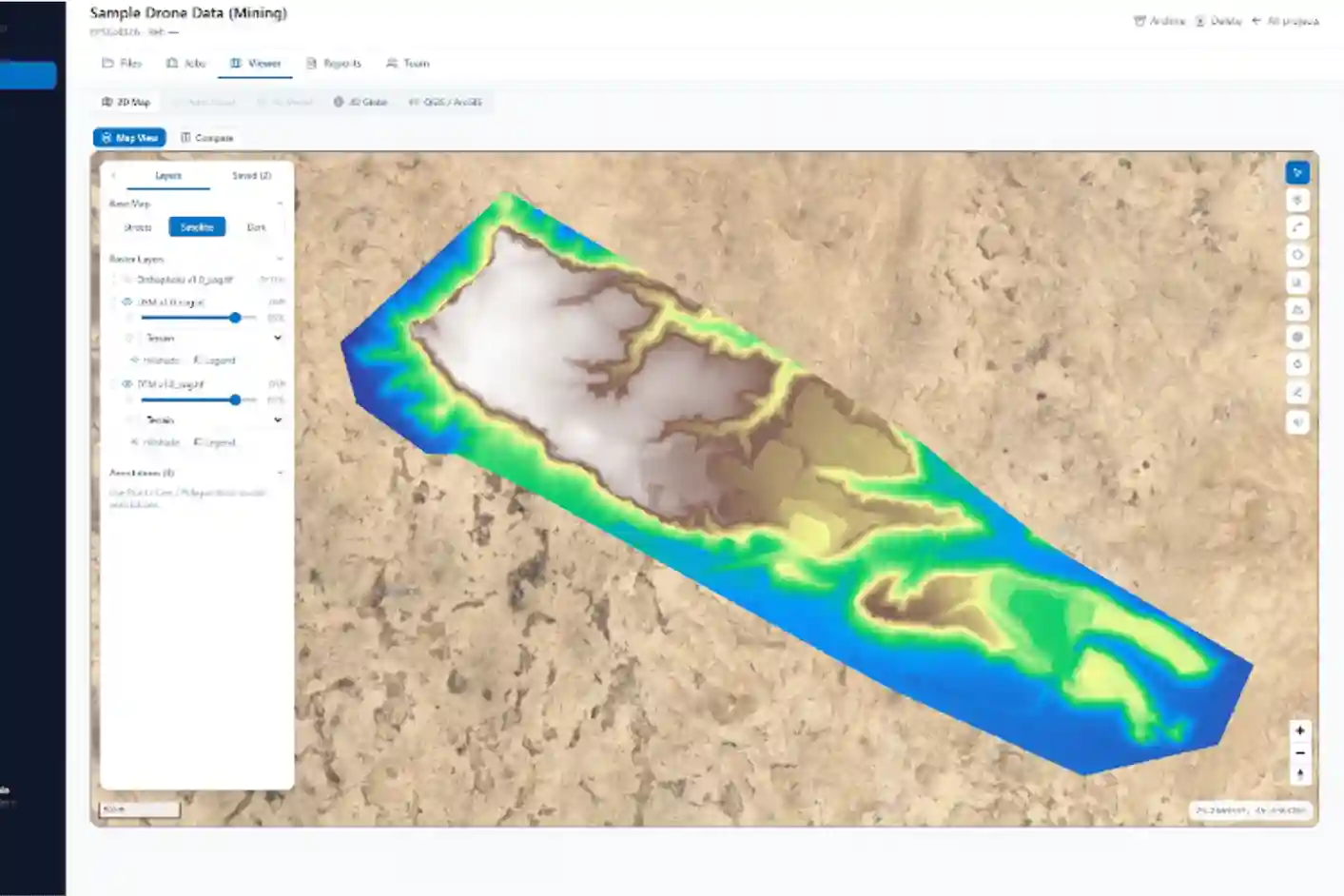
The Map Viewer serves as the primary visual analysis interface in Terra MapX. It offers four operational viewport modes: a flat 2D Map, a spherical 3D Globe, a dedicated 3D Model workspace for structural BIM files, and a direct web integration link to enterprise QGIS/ArcGIS environments.
The base mapping can be toggled between Street, Satellite, and Dark views to maximize feature visibility.
Within the viewer’s left-hand layer panel, users control raster and terrain models using real-time opacity sliders, toggle hillshade relief rendering, and activate hypsometric elevation color scales. This allows non-surveyors to visually evaluate site topography and instantly switch between:
- The Digital Surface Model (DSM): Captures the top surface envelope, including vegetation canopy, contractor temporary facilities, parked machinery, and raw material stockpiles.
- The Digital Terrain Model (DTM): Represents the stripped bare-earth surface after non-ground points have been filtered out, providing the true foundation for civil grading, pad design, and stormwater analysis.
Field inspections and linear corridor reviews are driven by an integrated floating tool palette on the right side of the interface:
- Elevation Pick: Clicking any point on the terrain displays its exact geodetic coordinates (Latitude and Longitude) and its orthometric elevation (Z in meters), allowing instant spot-elevation verification against design benchmarks.
- Elevation Profile and Dual-DEM Comparison: Drawing a line across any feature, such as a proposed road alignment, railway bed, utility trench, or drainage channel generates an interactive vertical cross-section graph at the bottom of the screen. The user selects a primary surface (such as DSM_cog.tif) and compares it directly against a baseline surface (such as DTM_cog.tif). The tool calculates slope gradients, identifies adverse slopes that cause water pooling, and displays exact elevation differences along every linear meter.
- Annotation Management and Export: Field notes, boundary lines, and measurement polygons save to a project layer and can be exported immediately into industry-standard formats, including GeoJSON, Shapefile (SHP), KML/KMZ, ، و GeoPackage (GPKG) for direct use in municipal GIS systems and design reviews.
Earthwork Volumetric Calculations and Commercial Stockpile Auditing
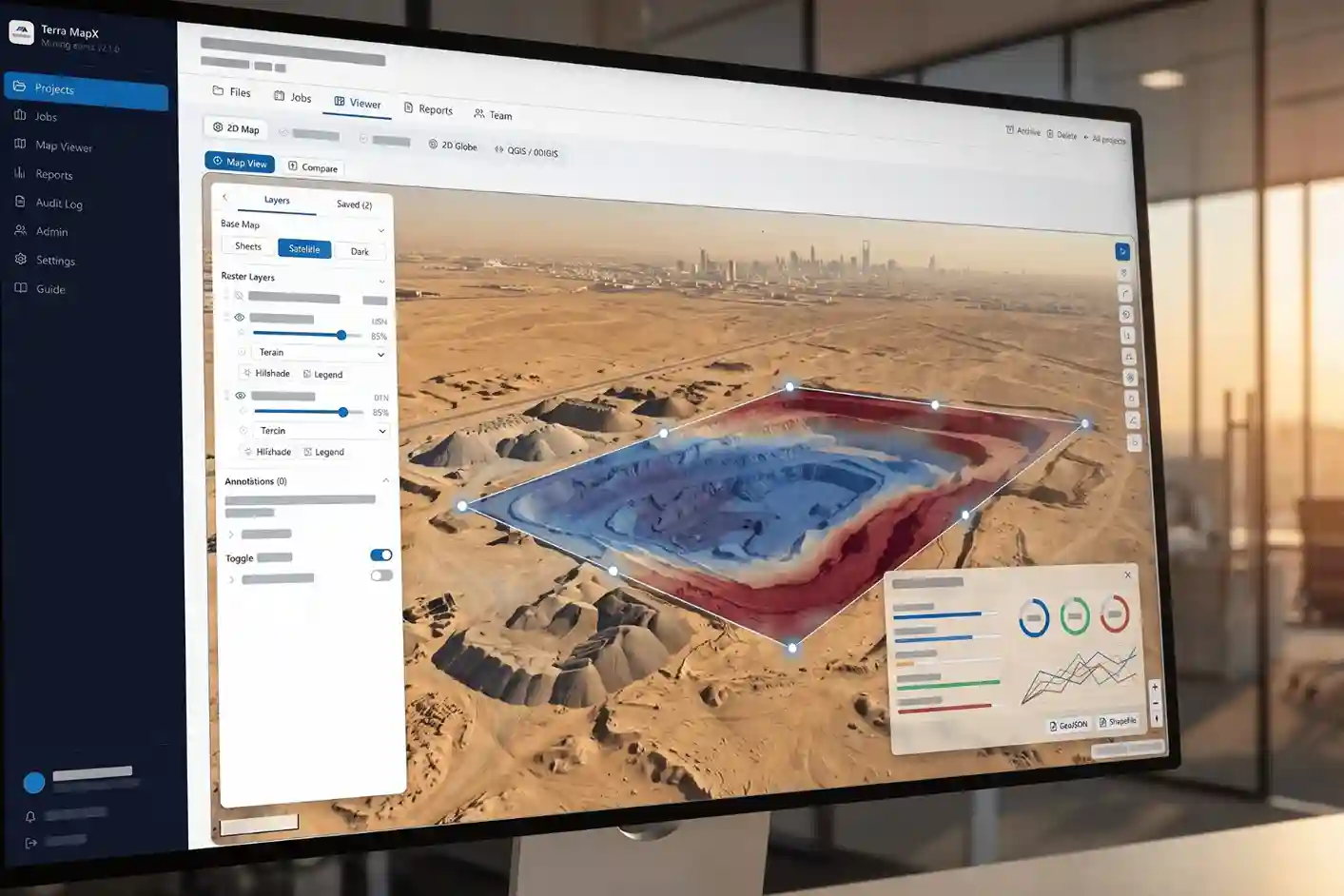
Disputes regarding bulk excavation volumes, borrow-pit extractions, and aggregate stockpiles represent one of the most frequent sources of financial disagreement between contractors and project developers.
Traditional verification relying on sparse rod measurements often yields conflicting numbers because irregular surface variations between survey points are missed.
Terra MapX resolves these commercial conflicts by integrating automated volumetric calculation tools directly within the browser interface.
A project engineer or commercial manager simply outlines an excavation pit, grading cell, or material stockpile using the polygon tool.
The calculation engine samples the underlying elevation grid to determine net, cut, and fill volumes within seconds.
To match contractual and geometric site conditions, Terra MapX supports multiple reference baseline configurations:
- Triangulated Base Plane: Fits a smooth 3D boundary plane connecting all perimeter vertices of the polygon. This conforms to the natural ground slope beneath freestanding sand, gravel, and crushed stone stockpiles, delivering precise volumes without requiring pre-stockpile ground surveys.
- Fixed Horizontal Elevation Benchmark: Computes excavation quantities down to a fixed absolute elevation datum (Z), making it ideal for deep foundation excavations, basement digs, and detention basin clearances.
- Design Surface Comparison: Compares the actual drone-surveyed bare-earth DTM against an imported design grading surface, automatically generating color-coded cut-and-fill maps that display exact net, cut, and fill quantities across active contract packages.
- Time-Series Surface-to-Surface Tracking: Compares survey baselines flown on different calendar dates (such as Month 1 versus Month 2). The software computes the exact material volume shifted during that operational period, providing objective, indisputable visual evidence for certifying interim contractor payment applications.
| Analytic Parameter | Traditional GNSS Rover Survey | Drone LiDAR + Terra MapX |
| Data Sampling Density | Coarse (spot elevations every 10 to 25 m) | Dense (100 to 500+ points/m²) |
| Corridor Coverage Rate | 1 to 3 km/day per team | 10 to 25+ km/day per crew |
| Site Safety Exposure | High (foot traffic near heavy equipment) | Negligible (remote non-contact flight) |
| Surface Representation | Interpolated contours (misses micro-relief) | True continuous surface (bare-earth DTM) |
| Platform Access | Static CAD drawings / point tables | Browser-streamed 3D model & dynamic analytics |
The measurement reliability of this cloud-based workflow is backed by empirical civil engineering research published on ResearchGate, which demonstrates that digital elevation models generated from RTK-guided drone aerial capture achieve earthwork cut-and-fill and stockpile volumetric measurement accuracies between 97% and 99.86% (yielding volume discrepancies as low as 0.1% to 3%), matching or exceeding ground-level GNSS cross-sectioning while providing full-surface coverage instead of sparse point interpolations.
Multi-Disciplinary Coordination: Design Alignment and Rework Elimination
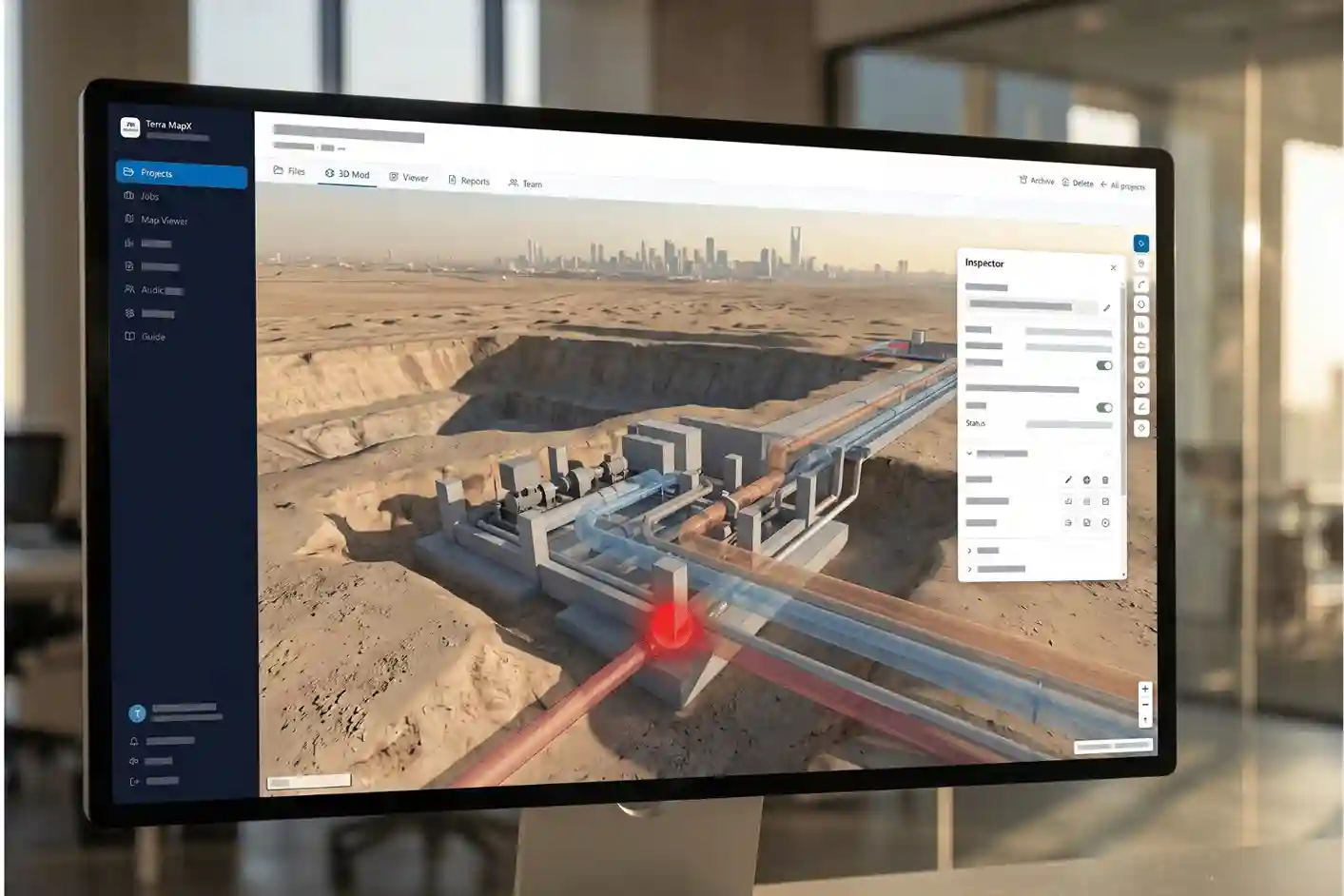
Beyond 2D mapping and terrain rasters, Terra MapX features a dedicated 3D Model environment for Building Information Modelling (BIM) and facility asset verification.
The viewer ingests multi-trade design models (GLB and IFC formats), enabling coordinated cross-discipline reviews across complex structures such as pump stations, treatment plants, and public buildings.
The 3D model manager provides granular control over individual trade assemblies:
- Trade Model Visibility: Users independently toggle and control specialized disciplines, including Structural (STR.glb), Mechanical/HVAC (HVAC.glb), Fire Fighting (FF.glb), Electrical (ELE.glb), Architectural (ARC.glb), and Plumbing (PL.glb).
- Parametric Attribute Inspection: Selecting any model component opens a comprehensive attribute inspector showing parametric engineering data, including Globally Unique Identifiers (GUID), system classifications, nominal pipe diameters, wall thicknesses, top and invert elevations, materials (such as HDPE or ductile iron), and design flow rates.
- Automated Clash Detection: Activating the directional clash detection engine (Clash detection dir) automatically highlights physical interferences between proposed equipment (such as sand filters, structural columns, or ductwork) and surrounding utility lines, alerting engineers to design errors prior to on-site assembly.
- Inspection and Navigation Controls: Teams can slice through structures using dynamic cross-section planes, calculate element volumes, hide ground planes and axes, and conduct first-person walkthrough inspections using integrated keyboard controls (WASD movement with eye-height adjustments), ensuring complete accessibility review across planned facilities.
Parametric Surface Ingestion and File-Level Interoperability
Integrating drone-derived reality capture into civil engineering software requires precise file formatting and coordinate handling to prevent geometric distortion.
When importing bare-earth LiDAR models into platforms such as Autodesk Civil 3D, Bentley OpenRoads, or Autodesk Revit, teams must maintain strict geodetic alignment.
Using standard exchange protocols like LandXML, TIN (Triangulated Irregular Network) surfaces, and DWG mesh objects, designers can import high-density bare-earth DTMs directly into their local project coordinate systems, such as UTM projections on the WGS84 datum or the Saudi Arabian National Spatial Reference System (SANSRS).
Within Autodesk Civil 3D, the drone-derived DTM becomes the live “Existing Ground” (EG) surface.
This baseline surface allows civil designers to build dynamic corridor assemblies:
- Horizontal and Vertical Alignments: Highway centerlines, railway track geometries, and arterial roadways are designed directly against actual terrain relief rather than outdated contour maps.
- Parametric Subassemblies: Road cross-sections, including asphalt wear courses, aggregate base layers, side-slopes, drainage ditches, and daylight daylighting benching are programmatically modeled to calculate cut-and-fill limits along every linear meter of the right-of-way.
- Subsurface Interface Modeling: In Autodesk Revit, high-density point clouds and surface meshes provide the exact vertical datums required to model concrete footings, grade beams, retaining walls, and basement slab interfaces, ensuring structural elements terminate at confirmed rock or load-bearing soil layers.
Pre-Construction 3D Clash Detection and Mass-Haul Optimization
Coordinating field-verified terrain models with proposed engineering designs inside a Common Data Environment (CDE), such as Autodesk Navisworks or Autodesk Construction Cloud enables automated spatial clash detection before contractors mobilize equipment.
Design models from architectural, civil, geotechnical, and MEP (mechanical, electrical, and plumbing) disciplines are federated against the actual site topography to flag geometric conflicts.
Clash detection algorithms evaluate two primary forms of earthwork and structural interference:
- Hard Spatial Clashes: Physical intersections where proposed infrastructure conflicts with existing physical obstacles. Examples include a planned drainage outfall clashing with an unrecorded surface rock ledge, or an access road grade cutting directly through an existing underground culvert that was not documented in legacy drawings.
- Soft Clearance and Clearance Buffer Clashes: Situations where proposed design grades violate minimum construction clearances. This includes instances where an excavated slope toe encroaches on property rights-of-way or where a buried pipeline does not achieve the mandatory minimum cover depth below the actual ground surface.
Beyond clash elimination, accurate bare-earth reality capture allows civil engineers to run mass-haul diagram analysis.
By comparing proposed LandXML finish-grade surfaces with the current LiDAR DTM, planning software calculates cumulative cut-and-fill volumes along linear corridors.
Designers can adjust vertical road alignments by fractions of a meter to achieve an optimal earthwork balance matching cut quantities to fill requirements on site.
This balance minimizes off-site soil hauling, eliminates disposal fees, and cuts external borrowing costs, which can save millions of Saudi Riyals across mega-scale developments.
The measurable economic value of this pre-construction surface coordination is proven by public investment studies published on ResearchGate, which establish that integrating accurate drone-derived 3D surface topography into pre-construction design coordination models eliminates up to 70% of spatial interferences, reduces costly on-site grading and excavation rework by 21% to 25%, and shortens master-plan project delivery schedules by 15% to 25%.
3D Machine Control Integration and Automated Field Grading
The operational connection between BIM and field execution closes through 3D Machine Control (3D-MC).
Rather than relying on traditional wooden survey stakes which are easily knocked over by earthmoving machinery and require constant re-staking by manual survey crews grading surfaces generated from drone surveys export directly to machine guidance formats.
Approved LandXML design surfaces and digital subgrades are converted into proprietary control files (compatible with Trimble, Topcon, and Leica systems) and uploaded directly into on-board machine computers on bulldozers, scrapers, and motor graders:
- Automated Hydraulic Blade Control: Onboard GNSS RTK receivers track the machine’s blade position in real time relative to the design surface, automatically raising, lowering, and tilting the cutting edge to shave cut areas and deposit fill precisely to grade.
- Sub-Centimeter Execution: Machine operators complete bulk excavation and finish-grading within millimeters of design tolerances on their first pass, eliminating the human error inherent in visual stake interpretation.
- Closed-Loop Drone Verification: As machine passes are completed, follow-up drone flights capture new topography, loading current surfaces back into Terra MapX to perform interim surface-to-surface comparisons. This closed feedback loop verifies grading compliance before paving crews mobilize, preventing premature asphalt failure and ensuring finished projects match approved design parameters.
Feeding the Municipal Digital Twin and Lifecycle GIS
For city authorities, royal commissions, and large-scale industrial zone managers, drone surveys represent continuous assets rather than disposable project tasks.
Captured terrain, imagery, and feature layers integrate into the broader “City Intelligence Loop”: capturing reality, processing it into reliable spatial layers, and streaming insights into enterprise systems to direct municipal governance.
Terra MapX supports direct interoperability with the Esri ArcGIS Ecosystem (including ArcGIS Enterprise and ArcGIS Urban).
Aerial orthomosaics and bare-earth elevation layers published as Open Geospatial Consortium (OGC) web services, WMS/WMTS tiles, and 3D scene layers.
These layers connect to Computerized Maintenance Management Systems (CMMS) such as SAP or IBM Maximo, associating spatial terrain models directly with physical municipal assets.
Demonstrating the long-term operational dividends of this spatial approach, engineering asset management research published on ResearchGate indicates that integrating multi-temporal drone survey baselines and reality-capture layers into centralized 3D digital twin dashboards allows municipal operators to transition to proactive maintenance regimens, cutting lifecycle infrastructure repair expenditures by 35% and extending asset service lifespans by up to 25 years.
The 90-Day Proof-of-Concept Framework
Transitioning municipal organizations and Tier-1 civil contractors from legacy surveying practices to an automated aerial capture workflow is most effectively managed through an agile, phased adoption roadmap:
- Weeks 1–2 (Scoping & Governance Alignment): Conduct executive and technical alignment sessions to establish priority corridors, baseline coordinate datums, and data integration targets.
- Weeks 3–4 (Regulatory Permitting & Site Screening): Secure operational clearances from civil aviation and geospatial authorities (such as GACA, GEOSA, and SANS), verify ground control points (GCPs), and configure enterprise data hosting protocols.
- Weeks 5–7 (Aerial Capture & Processing Execution): Mobilize the DJI M400 equipped with the Zenmuse L3 and P1 payloads across the target parcel, executing autonomous corridor flights and processing high-density point clouds in DJI Terra.
- Weeks 8–9 (Terra MapX Cloud Ingestion & Dashboard Staging): Publish bare-earth DTMs, high-resolution orthomosaics, and 3D meshes into the Terra MapX portal, enabling cross-departmental access and configuring custom cut-and-fill boundaries.
- Weeks 10–11 (Workflow Comparison & KPI Auditing): Evaluate digital measurements against traditional ground surveys to verify volumetric precision, timeline compression, and safety improvements.
- Week 12 (Scale-Up Roadmap & Operational Transition): Formulate long-term operating models, establish repeatable data cadence schedules, and deploy standardized SOPs across regional infrastructure portfolios.
Deploying the DJI M400 alongside the Zenmuse L3 and P1 payloads transforms site surveying from an intermittent, high-hazard field activity into a streamlined digital workflow.
By consolidating high-density LiDAR terrain models, millimeter-resolution orthomosaics, and cloud-based analytics within Terra MapX, infrastructure planners and engineering teams eliminate design clashes, de-risk active excavation zones, and establish authoritative spatial baselines that support assets across their operational lifespans.
To evaluate these capabilities across your infrastructure development, initiate a pilot parcel assessment through our specialized team in drone survey and mapping solutions.

 العربية